Aadhaar Card Link Mobile Number is one of the most important steps every resident must complete to access essential services like banking, PAN verification, government subsidies, DigiLocker, and online KYC. Without a mobile number linked to your Aadhaar, you cannot receive OTPs or complete identity verification for many daily tasks.
In this blog, we will explain why linking your mobile number is necessary, who needs to update it, and how you can easily complete the process through both online and offline methods.
What is Aadhaar Card Mobile Number Linking?
Aadhaar Card Mobile Number Linking means connecting your active mobile number with your Aadhaar so you can receive OTPs and complete identity verification for online services. When your number is linked, UIDAI can verify that you are the real owner of the Aadhaar by sending a secure one-time password during authentication.
Explanation of the Linking Process
The linking process is straightforward:
- You visit any Aadhaar Enrolment/Update Center.
- Submit a request to link or update your mobile number.
- Your biometrics (fingerprint or iris) are verified to confirm your identity.
- UIDAI then updates your mobile number in the database.
- Once approved, you can start receiving Aadhaar related OTPs within a few days.
Why UIDAI Requires a Working Mobile Number
UIDAI makes mobile number linking mandatory for several reasons:
- To send OTPs for Aadhaar authentication
- To ensure secure access to services like PAN linking, bank KYC, DigiLocker, and government schemes
- To prevent identity misuse by verifying every action through your personal mobile
- To allow you to download Aadhaar, update details, and check status online
Without a working mobile number, you cannot complete most Aadhaar based verifications.
When You Must Update or Re-Link Your Number
You need to update or re-link your Aadhaar mobile number in the following cases:
- You changed your mobile number
- Your old number is lost, inactive, or disconnected
- You didn’t link any number when your Aadhaar was created
- You are not receiving OTPs on Aadhaar services
- You are applying for new KYC processes (bank, PAN, SIM, loans)
Keeping your Aadhaar linked mobile number updated ensures uninterrupted access to all digital and government services.
Who Needs to Link Their Mobile Number with Aadhaar?
Linking a mobile number with Aadhaar is essential for anyone who wants to use Aadhaar based verification services. Here are the groups of people who must complete or update their Aadhaar mobile linking:
1. First-Time Aadhaar Users
If you recently enrolled for Aadhaar and didn’t provide a mobile number during registration, you must link one now. Without a registered number, you cannot receive OTPs, download your Aadhaar, or update any details online.
2. Users with Old or Inactive Mobile Numbers
If your mobile number is switched off permanently, deactivated, or no longer in use, you must update it in Aadhaar. UIDAI only sends OTPs to the active number linked in their system.
3. Anyone Who Changed Their Phone Number
If you switched to a new mobile number, you need to update it in your Aadhaar records. This helps ensure all Aadhaar-based services and verifications reach your current phone.
4. People Facing OTP Issues for Banking, PAN, or KYC
If you cannot receive Aadhaar OTPs while:
- Linking PAN with Aadhaar
- Completing bank KYC
- Using DigiLocker
- Applying for loans or SIM cards
- Accessing government subsidies
it means your mobile number may not be linked or needs to be updated.
Documents Required to link Aadhaar Card with Mobile Number
Linking or updating your mobile number in Aadhaar is a simple process, and the best part is that no documents are required for mobile number updates. You only need to verify your identity through biometrics.
List of Accepted ID Proofs (Only if Required for Other Updates)
Although mobile number update doesn’t need documents, these ID proofs are accepted for other Aadhaar updates:
- PAN Card
- Voter ID
- Passport
- Driving Licence
- Ration Card
- NREGA Job Card
- Photo Bank Passbook
- Government issued ID with photo
Aadhaar Card Copy
Carrying a physical or digital copy of your Aadhaar card is optional but helpful.
No Proof Required for Updating Mobile
To update or link your mobile number, UIDAI only requires:
- Biometric verification (fingerprint or iris scan)
No document submission is needed.
How to Link Aadhaar Card with Mobile Number
A. Online Process (If Your Current Mobile Number Is Already Linked)
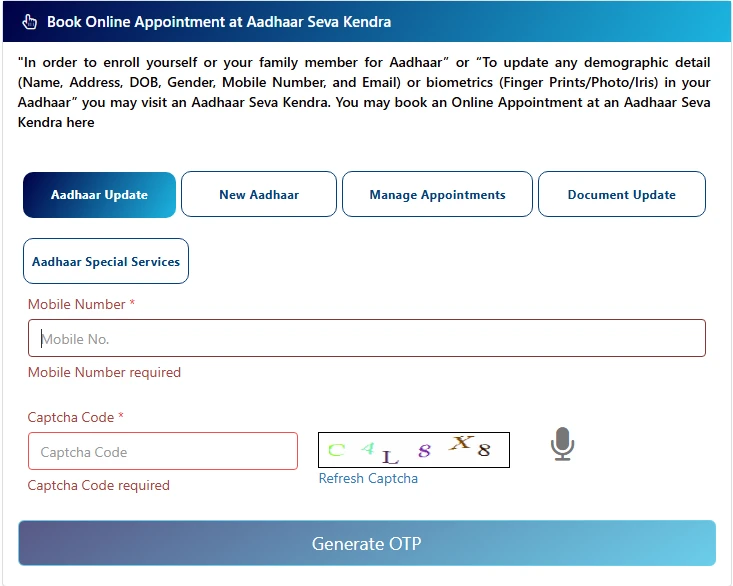
You can’t update your mobile number fully online, but you can book an appointment online through the UIDAI portal.
Steps:
- Visit the official UIDAI website: uidai.gov.in
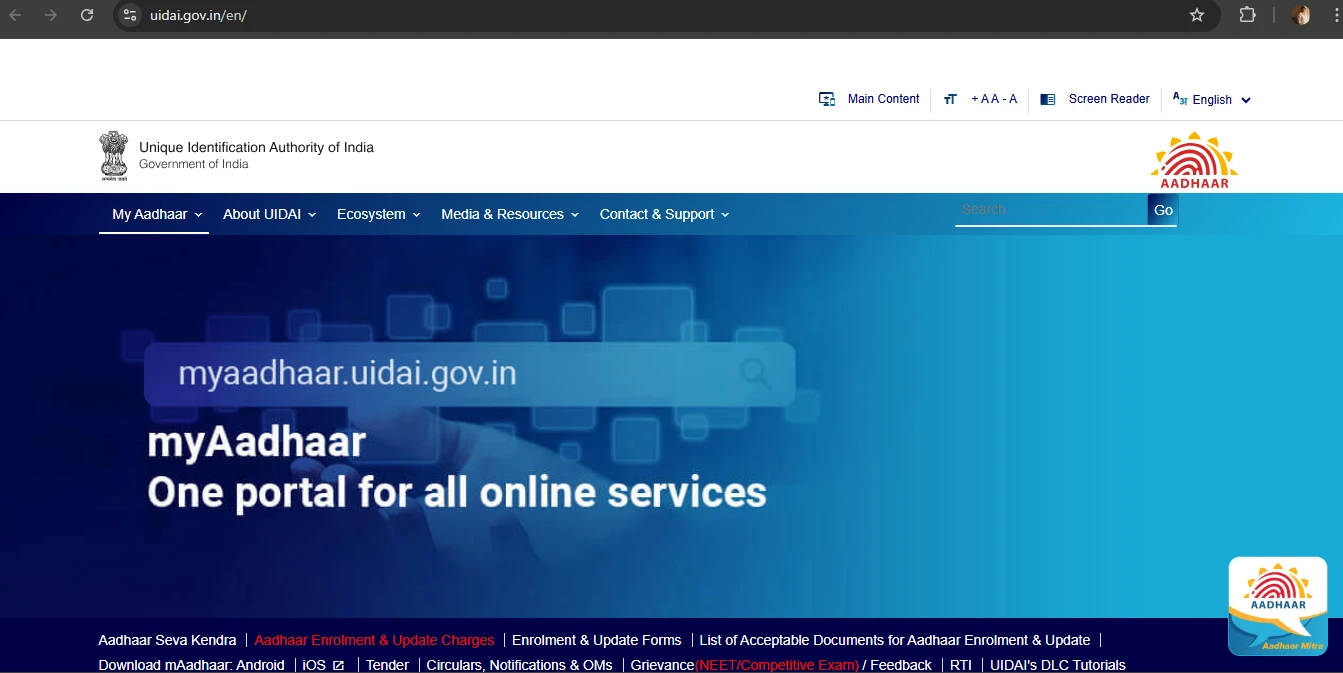
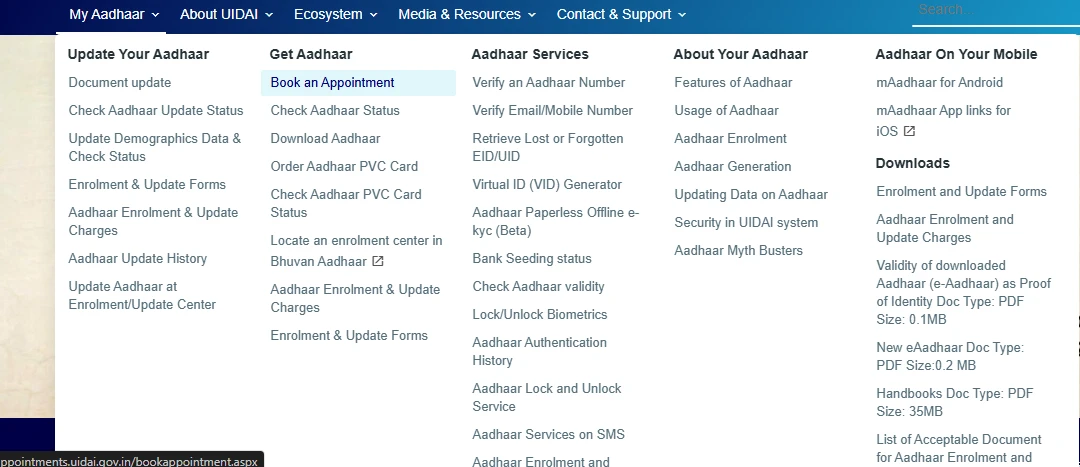
- Go to My Aadhaar → Book Appointment
- Select your city and Aadhaar Seva Kendra
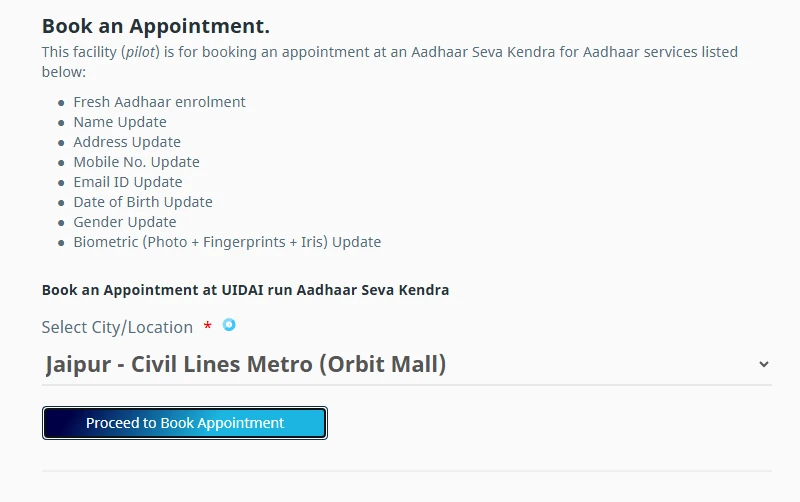
- Choose Update Mobile Number
- Select date & time slot
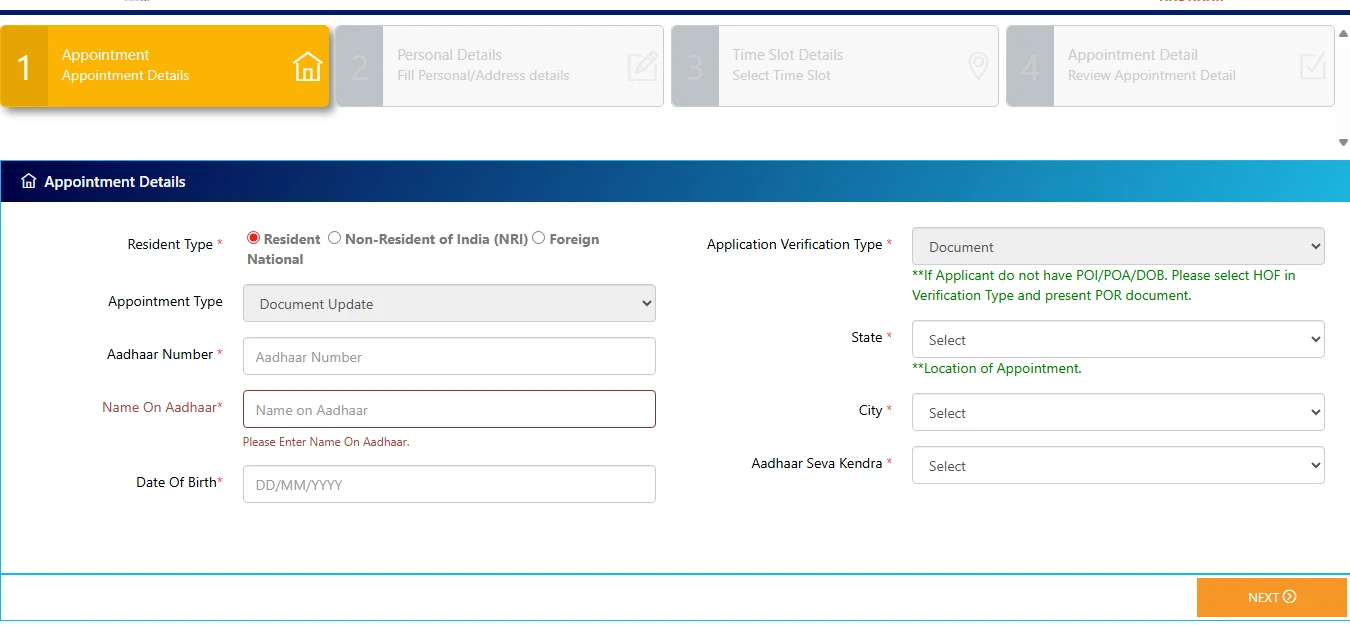
- Visit the center with Aadhaar for biometric verification
- Pay the update fee and collect the acknowledgment slip
B. Offline Process at Aadhaar Enrolment Center (Actual Linking Method)
1. Find the Nearest Aadhaar Seva Kendra
You can locate it through the UIDAI website under Locate Enrollment Center.
2. Fill the Aadhaar Update Form
Ask for the Aadhaar Correction/Update Form and fill in your new mobile number.
3. Biometric Verification
The Aadhaar operator will verify your identity using fingerprints or iris scan.
4. Fee Details
UIDAI charges a standard fee of ₹50 per update request.
5. Expected Processing Time
Mobile number linking usually takes:
- 3–5 working days (Aadhaar Seva Kendra)
- Up to 10 days (other enrollment centers)
You will receive an SMS once the number is updated.
How to Change or Update Mobile Number in Aadhaar
Steps to Update Without Old Number
If you lost your old mobile number, don’t worry. You can still update it:
- Visit any Aadhaar center
- Submit an update request for a new mobile number
- Complete biometric authentication
- Pay ₹50 fee
No OTP from the old number is needed.
When OTP Is Needed / Not Needed
- Not needed: When updating your mobile number
- Needed: When using any Aadhaar online service after linking the new number
What If Your Old Number Is Lost?
Simply visit the Aadhaar center no additional documents or old number OTP is required.
How to Check if Your Mobile Number Is Linked with Aadhaar
Using UIDAI’s “Verify Mobile Number” Tool
- Go to UIDAI → Verify Aadhaar
- Enter Aadhaar number and mobile number
- Submit and check status
Serviceability Checks
- You will see a message showing whether your mobile number is linked or not.
Alternative Ways to Confirm
- Try downloading Aadhaar
- Try updating Aadhaar details online
- Attempt KYC with your bank or DigiLocker
If OTP is not received, your number may not be linked.
Common Problems & Solutions while linking Aadhaar card with mobile number
1. Not Receiving OTP
- Your mobile number may not be linked
- Network issues or SMS blocking
- Aadhaar server delays
2. Incorrect Mobile Number in Aadhaar
You must update it at an Aadhaar center.
3. Appointment Not Available
Try nearby Aadhaar centers or choose a different date.
4. Aadhaar Update Rejection
Reasons:
- Mismatch of biometrics
- Wrong information
Try re-applying with correct details.
Link Aadhaar Card with Mobile Number: Latest UIDAI Rules
Charges & Limits
- ₹50 per update
- No free updates allowed
- Only one mobile number can be linked to Aadhaar
Mandatory KYC Linking
Banks, PAN, telecom, and many government services require Aadhaar OTP verification.
New Verification Methods
UIDAI is rolling out:
- Faster OTP delivery
- Improved biometric accuracy
- Online appointment booking for all cities
FAQs about Aadhaar – Mobile Number Linking
1. How can I link mobile number with Aadhaar?
Ans: Visit an Aadhaar center, complete biometric verification, and pay ₹50.
2. Can I link Aadhaar mobile number online?
Ans: No, but you can book an appointment online.
3. What is the fee to update mobile number in Aadhaar?
Ans: UIDAI charges ₹50.
4. How long does Aadhaar mobile update take?
Ans: It usually takes 3–10 days.
5. Can I link mobile number to Aadhaar without OTP?
Ans: Yes. OTP is not required during the update process.
6. What if I lost my old registered mobile number?
Ans: You can update your new number using biometric verification at a center.
Conclusion
Linking your mobile number with Aadhaar is essential for completing online verification, accessing government services, securing your identity, and ensuring smooth KYC processes. Keeping your number updated helps you avoid OTP issues and ensures uninterrupted use of Aadhaar services. Make sure to complete your Aadhaar Card Link Mobile Number update on time for hassle free access to all digital services.
Sources:
Leave a Reply