Link Aadhaar With PAN Card Online is now a mandatory requirement for all taxpayers in India, and failing to do so can lead to your PAN becoming inactive. The government has made Aadhaar PAN linking compulsory to streamline identity verification, prevent tax fraud, and ensure accurate financial records. If you haven’t completed the process yet, now is the right time to do it especially before the deadline to avoid penalties or disruptions in your banking, tax filing, and financial transactions.
In this blog, we’ll also walk you through the exact step-by-step guide, documents required, fees, and how to check your Aadhaar PAN link status online so you can complete the process quickly and without errors.
Key Highlights
- PAN holders who obtained their card on or before 1st October 2024 using Aadhaar enrolment ID can link PAN – Aadhaar free of cost by 31st December 2025.
- From 1st July 2025, Aadhaar authentication is mandatory for all new PAN card applications, as per the latest CBDT update.
- A penalty of ₹1,000 is applicable if you link your PAN with Aadhaar after the due date.
What is Aadhaar PAN Linking?
Aadhaar–PAN linking means connecting your Aadhaar number (identity proof) with your PAN card (tax identity number) in the government database. This helps verify that both documents belong to the same person.
Purpose of Linking
- To eliminate duplicate or fake PAN cards
- To ensure accurate taxpayer identification
- To link your financial and tax records correctly
- To prevent tax evasion and fraud
Government Requirement
The Government of India has made Aadhaar PAN linking mandatory for all individuals who have a PAN and are eligible for Aadhaar. If you don’t link your Aadhaar with PAN, your PAN may become inactive, which can affect your financial transactions, tax filing, and banking services.
Benefits of Aadhaar PAN Link
- Ensures your PAN remains active and valid
- Helps avoid penalties for non-linking
- Makes tax filing faster and more secure
- Prevents duplicate or fraudulent PAN usage
- Simplifies verification for financial transactions
Documents Required to Link Aadhaar With PAN Card
Before you start the linking process, make sure you have the following documents and details ready:
1. PAN Card
You must have your valid Permanent Account Number (PAN) issued by the Income Tax Department. Ensure the details—especially your name and date of birth—match your Aadhaar information to avoid verification errors.
2. Aadhaar Card
A valid Aadhaar number issued by UIDAI is required. Your Aadhaar should be active and contain the correct demographic details (name, DOB, gender). If any details are outdated, update Aadhaar first.
3. Linked Mobile Number for OTP
Your mobile number linked to Aadhaar is required for OTP verification during the online linking process. The system will send an OTP to this number to authenticate your identity.
Eligibility & Important Rules for Aadhaar Pan Linking
Before linking your Aadhaar with PAN, it’s important to understand who is required to link, exemptions, penalties, and the latest rules set by the government.
1. Who Must Link Aadhaar With PAN?
Linking Aadhaar and PAN is mandatory for:
- All Indian residents who have both PAN and Aadhaar
- Individuals who file income tax returns
- Anyone using PAN for banking, finance, or investment-related transactions
If you fall into any of these categories, you must complete the linking process to keep your PAN active.
2. NRI/OCI Rules
The government has provided certain relaxations:
NRIs (Non-Resident Indians)
- NRIs are not required to link Aadhaar with PAN if they do not hold an Aadhaar number.
- If an NRI has voluntarily enrolled for Aadhaar, then linking becomes applicable.
OCI/PIO
- Overseas Citizens of India (OCI) and Persons of Indian Origin (PIO) are exempt from Aadhaar–PAN linking unless they have obtained an Aadhaar number.
Residents of Assam, Meghalaya & J&K (Special Case)
- Earlier, residents of these states were exempt.
- From 2025 onwards, the rule applies universally unless specifically exempted by UIDAI or CBDT.
3. Penalty Charges
As per the latest Income Tax rules:
- A penalty fee of ₹1,000 is applicable for linking Aadhaar with PAN after the previous deadline.
- Linking is not allowed without paying this fee (if linking is done late).
- PAN will become inoperative if not linked, affecting banking, demat, and tax-related services.
4. Deadline for Aadhaar PAN Linking (2025 Update)
- The last official notified deadline was 30 June 2023.
- Those who did not complete linking by that date must pay the penalty before linking.
- The government has not announced a new deadline in 2025, but linking remains mandatory before using PAN for any financial or tax activity.
How to Link Aadhaar With PAN Card Online (Step-by-Step Guide)
Linking your Aadhaar with your PAN online is the easiest and fastest method. Follow this step-by-step process using the official Income Tax e-Filing portal.
Method 1: Through the Income Tax e-Filing Portal
Step 1: Visit the Official IT Portal
Go to the official Income Tax e-Filing website:
Make sure you are using the correct government website for security.
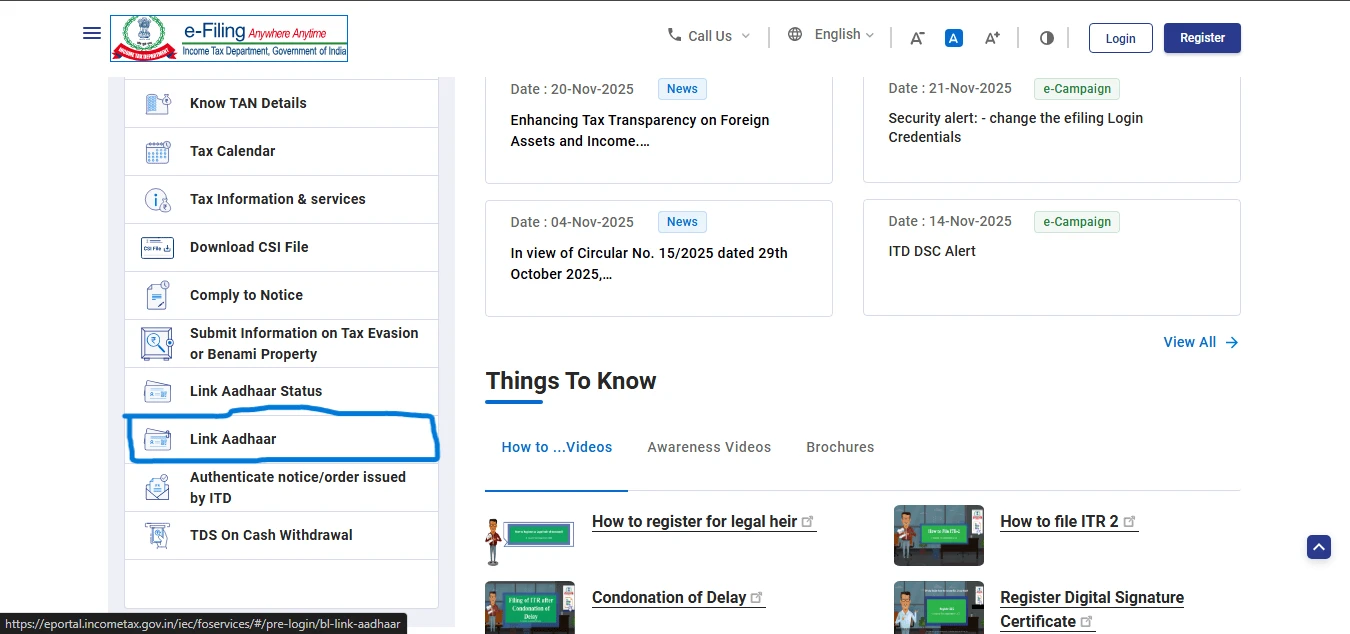
Step 2: Click on “Link Aadhaar”
On the homepage, scroll down and find the ‘Link Aadhaar’ option under the Quick Links section.
Click on it to open the Aadhaar PAN linking form.
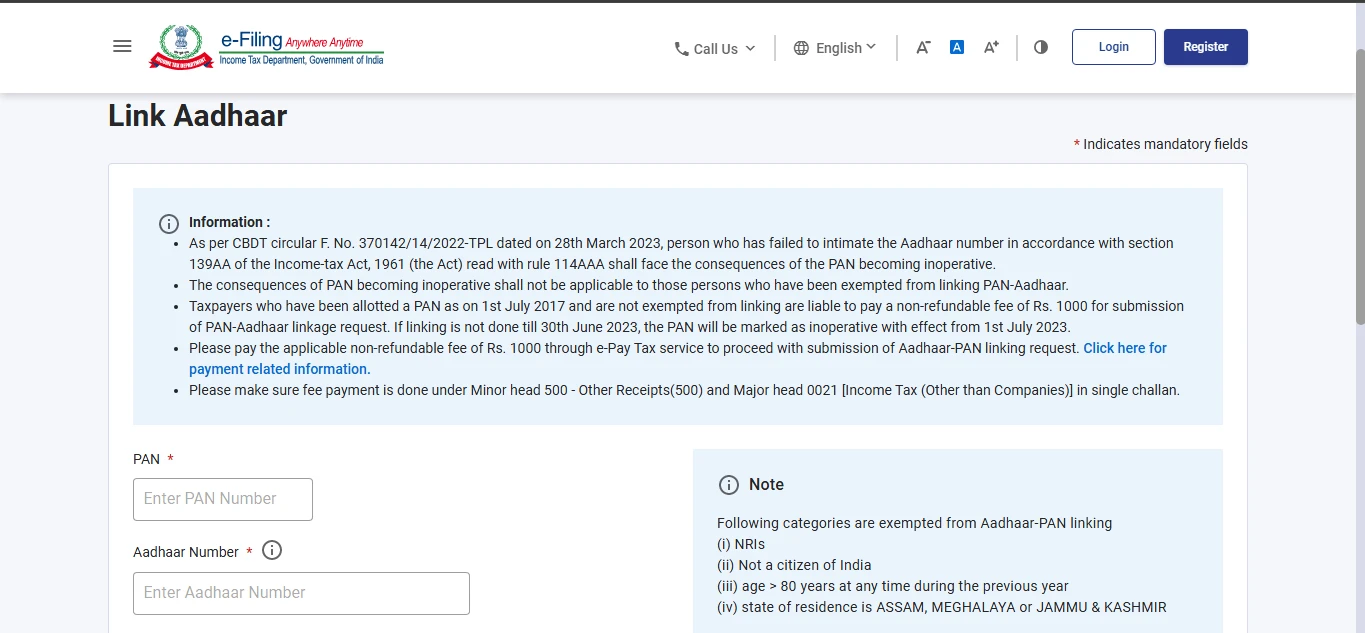
Step 3: Enter PAN, Aadhaar Number & Name
Fill in the required details:
- Your PAN number
- Your Aadhaar number
- Your Name as per Aadhaar
- Check the box if only your year of birth is mentioned in Aadhaar
Review all details carefully to avoid mismatch errors.
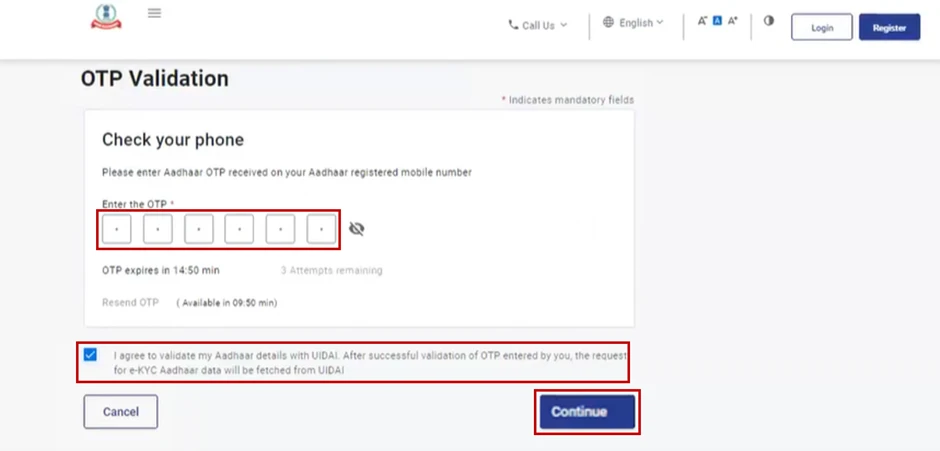
Step 4: Verify via OTP
You will receive a 6-digit OTP on your mobile number linked with Aadhaar.
Enter the OTP to verify your identity and continue.
Step 5: Pay the Linking Fee
If you are linking Aadhaar after the previous deadline, a ₹1,000 linking fee is mandatory.
You will be redirected to the payment page (NSDL/e-Pay Tax portal) to complete the transaction.
Once payment is successful, return to the portal and proceed again with the linking request.
Step 6: Submit and Check Status
After completing the verification:
- Click Submit
- If details match, you will see a confirmation message
- You can check the status anytime using the ‘Link Aadhaar Status’ option on the portal
If the status shows “Pending for verification”, wait 24–48 hours.
How to Link Aadhaar With PAN Card After Payment
If you have already paid the ₹1,000 fee, you must complete the linking process separately. Payment alone does not link Aadhaar and PAN — you still need to submit the Aadhaar–PAN linking request.
Steps to Complete Verification After Payment
1. Visit the Income Tax e-Filing Portal
Go to www.incometax.gov.in and open the homepage.
2. Click on “Link Aadhaar” Under Quick Links
You will be taken to the Aadhaar–PAN linking form again.
3. Enter PAN and Aadhaar Number
Fill in your:
- PAN
- Aadhaar
- Name as per Aadhaar
Then proceed to the next step.
4. System Automatically Detects Payment
If your payment is successfully recorded, the portal will verify it automatically.
You will not be asked to pay again.
5. Verify Aadhaar Through OTP
You will receive an OTP on your Aadhaar-linked mobile number.
Enter the OTP to complete authentication.
6. Submit the Request
Once OTP is verified, click Submit.
If all details match, your Aadhaar and PAN will be linked successfully within a few hours.
What to Do If Payment Doesn’t Reflect
Sometimes the payment status does not sync instantly with the Income Tax portal. Here’s what you can do:
1. Wait for 24–48 Hours
Often the system takes time to update. Wait at least one day and try again.
2. Check Payment Status on NSDL/Protean Portal
Visit the Protean (NSDL) payment or challan status page and enter:
- PAN
- Date of Birth
- Transaction ID
This helps confirm whether your payment was successful.
3. Clear Browser Cache and Try Again
Sometimes old cache data blocks the updated status.
Use incognito/private mode or clear cache and retry.
4. Contact Income Tax Helpdesk
If payment still doesn’t reflect after 48 hours:
- Call Income Tax Helpline: 1800-103-0025
- Raise a ticket through the e-Filing Helpdesk on the portal
Keep your transaction receipt ready for verification.
5. Do NOT Make Double Payment
Avoid paying ₹1,000 again.
The system will not refund duplicated payments.
How to Link Aadhaar With PAN Card Offline at Aadhaar Seva Kendra
If you prefer an offline option or face issues with the online method, you can link your Aadhaar with PAN at any Aadhaar Seva Kendra (ASK). This process is guided by UIDAI officials and is suitable for those who need assistance with biometrics or document corrections.
1. Visit the Nearest Aadhaar Seva Kendra (ASK)
Locate your nearest authorized Aadhaar centre through the UIDAI website.
Visit the centre with:
- Your PAN card
- Your Aadhaar card
No prior appointment is required, but weekends may be crowded.
2. Fill the Aadhaar–PAN Linking Form
At the centre, request the Aadhaar–PAN linking/update form.
Fill in basic details:
- PAN number
- Aadhaar number
- Name
- Date of birth
- Address (if required)
Double-check the details to avoid rejection or delays.
3. Provide Biometrics for Verification
The operator will verify your identity through:
- Fingerprint scan, or
- Iris scan
This biometric authentication confirms that the Aadhaar details belong to you.
4. Fee Details
The following charges apply for Aadhaar PAN linking at ASK:
- ₹50 (Typical charge for Aadhaar update services)
- Additional charges may apply only if demographic updates are needed
Once the operator completes the process, you will receive an Acknowledgment Slip for your records.
Your Aadhaar–PAN link request will usually be processed within 7–10 days after verification.
How to Check Aadhaar–PAN Link Status Online
After submitting your request, you can easily check whether your Aadhaar and PAN have been linked using the Income Tax portal.
1. Check From the IT Portal
Step-by-Step Process
- Visit the official Income Tax e-Filing website: www.incometax.gov.in
- On the homepage, scroll to the Quick Links section
- Click on “Link Aadhaar Status”
- Enter your:
- PAN
- Aadhaar number
- Click “View Link Aadhaar Status”
- The system will instantly show your current status.
2. Status Results Explained
When you check the status, you will see one of the following messages:
Linked
- Your Aadhaar and PAN are successfully linked
- You can use your PAN for all financial and tax-related activities
- No further action is required
Not Linked
- Aadhaar and PAN are not linked
- You must complete the linking process immediately
- If linking is done after the earlier deadline, you must pay ₹1,000
Pending for Verification
- Your linking request is submitted
- Verification is still in process
- Usually gets updated within 24–48 hours
Payment Completed But Linking Not Done
- Payment is received but you haven’t submitted the linking request
- Go back to the portal and complete OTP verification
Common Errors & How to Fix Them
While linking Aadhaar and PAN, many users face errors due to mismatched data or authentication issues. Here’s how to fix the most common problems:
1. Name Mismatch in Aadhaar/PAN
Cause: Your name is spelled differently on both documents.
Solution:
Update your name in Aadhaar or PAN so both match exactly, then retry the linking process.
2. Date of Birth (DOB) Mismatch
Cause: Different birth dates in Aadhaar and PAN records.
Solution:
Update DOB in Aadhaar (preferred) or PAN, and re-attempt linking once details are corrected.
3. Invalid OTP
Cause:
- OTP not received
- Wrong mobile number
- OTP expired
Solution:
Ensure your mobile number is linked to Aadhaar, request OTP again, use a stable network, and avoid multiple requests within seconds.
4. Payment Not Reflecting
Cause: Delay in reconciliation between NSDL/Protean and IT portal systems.
Solution:
Wait 24–48 hours, check payment status on the NSDL/Protean portal, try in incognito mode, and if still not updated, contact the IT helpdesk.
5. Aadhaar Not Updated
Cause: Outdated or incorrect information in Aadhaar.
Solution:
Update Aadhaar details at a UIDAI centre or online, ensure your mobile number is registered, and retry linking after updates are approved.
Fees for Aadhaar PAN Linking (Latest 2025)
If you are linking your Aadhaar with PAN after the previous government deadline, a penalty fee applies. Here’s everything you need to know.
1. Applicable Fee Amount
As per the latest Income Tax Department rules:
- A ₹1,000 fee is mandatory for Aadhaar–PAN linking if done after 30 June 2023.
- This payment must be made before submitting the linking request.
2. When Payment Is Required
You must pay the fee in the following situations:
- If you did not link Aadhaar with PAN before the previous deadline
- If your PAN has become inoperative due to non-linking
- If the system shows “Fee Payment Required” during the linking attempt
Note: Payment alone does not complete the linking. You must return to the IT portal and submit the linking request after payment.
3. Exempt Categories
The following individuals are not required to link Aadhaar with PAN or pay the fee:
- NRIs who do not have an Aadhaar number
- OCI/PIO cardholders without Aadhaar
- Individuals aged 80+ (Super Senior Citizens)—exempt in most cases
- Residents of Assam, Meghalaya, and Jammu & Kashmir (as per earlier rules; subject to updates)
- Individuals not eligible for Aadhaar under the Aadhaar Act
If you fall into these categories, your PAN will remain active without linking.
FAQs about Aadhaar Pan Linking
1. Is Aadhaar–PAN linking mandatory?
Yes. For all individuals eligible for Aadhaar, linking Aadhaar with PAN is mandatory for tax filing, banking, and financial transactions.
2. What is the fee for linking?
The fee for linking Aadhaar with PAN after the deadline is ₹1,000.
3. Can I link Aadhaar with PAN without OTP?
No. OTP verification through your Aadhaar-linked mobile number is mandatory for online linking.
4. How long does it take to update?
Typically, Aadhaar–PAN linking is updated within:
- Instantly for most users
- 24–48 hours if verification is pending
5. Why is my PAN still inactive after linking?
This can happen if:
- Payment was made but linking request was not submitted
- Aadhaar or PAN details don’t match
- Verification is still pending in the system
Recheck your status on the IT portal.
6. Can NRIs link Aadhaar with PAN?
NRIs are not required to link Aadhaar with PAN if they do not have an Aadhaar number.
If they voluntarily obtained Aadhaar, linking becomes mandatory.
Conclusion
Linking your Aadhaar with PAN is essential to keep your PAN active and avoid disruptions in tax filing, banking, and financial services. The process is simple, and completing it early ensures you stay compliant with government rules.
To avoid penalties or inactive PAN issues, complete the linking process as soon as possible and regularly check your Aadhaar–PAN status online. Staying updated will ensure smooth financial transactions and hassle-free tax filing.
Sources:
Leave a Reply